


Image: Orange Pi SBCs (from left to right): Orange Pi 6 Plus, Orange Pi 5 Plus, Orange Pi RV2
To augment my Raspberry Pi Cluster, I have been experimenting with SBCs from a Chineses company called Orange PI. Orange Pi offers many SBCs that are similar to those offered by Raspberry Pi. They also offer some unique SBCs. In this post I will compare the ARM64 Orange PI 5 Plus to the Raspberry Pi 5. I will also compare the unique RISC-V Orange Pi RV2 and the new ARM64 Orange Pi 6 Plus.
Raspberry Pi 5
The base for our comparison is the Raspberry Pi 5. It is based on a quad-core ARM64 SoC from Broadcom (BCM2712) clocked up to 2.4GHz. All four cores are based on the Cortex-A76 reference design. The configuration that I tested has 16GB and sells for $145. In addition I put an Orico J10-2242 256GB M.2 SSD on it as the secondary storage. You will need to purchase an M.2 HAT (Hardware Attached on Top) for $20-$30 in order to put the SSD on the Raspberry Pi 5. A case like the HighPi Pro 5S Case is $10. The Raspberry Pi 5 became available in October 2023.

Orange Pi 5 Plus
The Orange Pi 5 Plus is based on an 8-core ARM64 SoC from Rockchip (RK3588) clocked up to 2.4 GHz. Four of the cores are high-performance Cortex-A76 cores while the remaining four cores are power-efficient Cortex-A55 cores. I tested the 32 GB version that sells for $275 with case, Wi-Fi/Bluetooth module and eMMC module. The secondary storage for the Orange Pi 5 Plus is a Kingston NV2 1TB M.2 2280 SSD. The Orange Pi 5 Plus became available in March 2023.


Orange Pi RV2
The Orange Pi RV is not an ARM-based SBC but instead one based on the open source RISC-V processor. It uses an 8-core SoC from Ky (X1) clocked up to 2.0 GHz. All eight cores are high-performance SpacemiT X60 cores. I tested the 8 GB version that sells for $64 plus $10 for a case. The secondary storage for the Orange Pi RV2 is a ORICO D10 256TB M.2 2230 SSD. The Orange Pi RV2 became available in November 2024.


Orange Pi 6 Plus
The Orange Pi 6 Plus is based on an 12-core ARM64 SoC from CIX (CD8160) clocked up to 2.6 GHz. Eight of the cores are high-performance Cortex-A720 cores while the remaining four cores are power-efficient Cortex-A520 cores. I tested the 32 GB version that sells for $357 with case, and Wi-Fi/Bluetooth module. The secondary storage for the Orange Pi 6 Plus is a Crucial P310 512GB M.2 2280 SSD. The Orange Pi 6 Plus became available in November 2025.


SBC Specifications
| Feature | Raspberry Pi 5 | Orange Pi 5 Plus | Orange Pi RV2 | Orange Pi 6 Plus |
|---|---|---|---|---|
| SoC | Broadcom BCM2712 | Rockchip RK3588 | Ky X1 | CIX CD8160 |
| Performance Cores | 4x ARM64 Cortex-A76 | 4x ARM 64 Cortex-A76 | 8x SpacemiT X60 RISC-V | 8x ARM 64 Cortex-A720 |
| Efficiency Cores | none | 4x ARM64 Cortex-A55 | none | 4x ARM64 Cortex-A520 |
| NPU Rating | none | 6 Tops | 2 Tops | 28.8 Tops |
| Clock Frequency | 2.4 GHz (max) | 2.4 GHz (max) | 2.0 GHz (max) | 2.6 GHz (max) |
| Memory | 16 GB | 32 GB | 8 GB | 32 GB |
| Storage | 1x M.2 PCIe 2.0 1 Lane (Optional) | 1x M.2 PCIe 3.0 4 Lane | 2x M.2 PCIe 2.0 2 Lane | 2x M.2 PCIe 4.0 4 Lane |
| Ethernet | 1 Gbps | 2x 2.5 Gbps | 2x 1 Gbps | 2x 5 Gbps |
| WiFi | WiFi 5 - 802.11ac | WiFi 6 - 802.11ax (Optional) | WiFi 5 - 802.11ac | WiFi 6 - 802.11ax (Optional) |
| Bluetooth | 5.0 | 5.3 (Optional) | 5.0 | 5.3 (Optional) |
| USB | 2x USB 2.0 2x USB 3.0 | 2x USB 2.0 2x USB 3.0 1x USB-C | 1x USB 2.0 3x USB 3.0 | 2x USB 2.0 2x USB 3.0 2x USB-C |
| Video | 2x 4K@60 HDMI | 2x 8K@60 HDMI 2.1 | 1x 1920x1440@60 HDMI 2.0 | 1x DP 1.4 4K@120 2x TYPE-C DP 1x 4K@60 HDMI 1.4 |
| GPU | VideoCore VII | Mali-G610 | IMG BXE-2-32 | Immortalis-G720 |
| Cost (w/case) | $185 + SSD Cost | $275 + SSD Cost | $74 + SSD Cost | $357 + SSD Cost |
Impressions
The boards other than the Orange Pi 6 Plus are designed for the maker community. They are low cost SBCs that can be used to power all sorts of projects.
For the Raspberry Pi 5 the vendor supplied OS is the Raspberry Pi OS which is a Debian 13 Linux distribution. Ubuntu has a distribution for the Raspberry Pi as does Armbian. The Raspberry Pi 5 has become an industry standard used in education and for makers having sold 2M+ units. It will serve as our base-line in performance comparisons.
Even though the Orange Pi 5 Plus seems like a beefed up Raspberry Pi 5, the Orange Pi 5 Plus actually came to market before the Raspberry Pi 5. It is a bit more expensive but you get four efficiency cores and an NPU for running AI workloads. You also get 16GB more RAM. While WiFi and Bluetooth are built-in to the Raspberry PI 5, they are available as an optional M.2 E-Key card for the Orange Pi 5 Plus making it a bit more expensive. Both boards have a GPU that can support 4K or better video via HDMI if you want to use the board as a desktop computer or in a kiosk setting. The vendor supplied OS include Debian 12, Ubuntu, Orange Pi OS (OpenHarmony) and Android.
The Orange Pi RV2 is a very low cost alternative to the Raspberry Pi 5 which makes it great for makers. It doesn’t use the usual ARM64 cores but instead uses the open source RISC-V core designs. Using an open source CPU design probably helps keep the cost down. In other cost cutting areas it maxes out at only 8 GB of RAM and only has a 2 Tops NPU. But because the board uses the RISC-V architecture, the software support for it is not as mature as the ARM64 ecosystem. The vendor supplied OS include Ubuntu and Orange Pi OS (OpenHarmony).
The Orange Pi 6 Plus is a bit different than the other three. Even though it is a small (but larger than the form factor of the other three) SBC computer, it is a desktop class computer. It runs Linux very well and feels snappy and responsive. It has many more video connection options than the other three SBCs. With 12 cores, 32 GB memory, a 28 Tops NPU and 2x 5 Gbps ethernet ports, it is definitely more powerful and intended for use as a desktop computer. The vendor supplied OS include Debian 12, Orange Pi OS (Open Harmony) and Android. Because this SoC is new, the software support is currently somewhat limited. For example Gnome Remote Desktop isn’t supplied on the vendor Debian distribution and doesn’t seem to work if you try to install it yourself. There doesn’t seem to be an Ubuntu distribution at this time nor is there Armbian support.
CPU Performance
Using various tools I benchmarked the four systems. Below is the raw data from the benchmark runs.
| Test | Raspberry Pi 5 | Orange Pi 5 Plus | Orange Pi RV2 | Orange Pi 6 Plus |
|---|---|---|---|---|
| Sysbench Single Thread CPU | 1011 | 930 | 326 | 1099 |
| Sysbench Multi-Thread CPU | 4043 | 5134 | 2590 | 10063 |
| 7zip Compressing | 12833 | 18112 | 4210 | 33410 |
| 7zip Decompressing | 19237 | 25218 | 10527 | 30884 |
| openssl aes-256-cbc | 2200.58 GB/s | 2523.82 GB/s | 160.44 GB/s | 6944.93 GB/s |
| openssl sha256 | 196.20 GB/s | 229.51 GB/s | 45.01 GB/s | 619.94 GB/s |
| openssl sha512 | 105.24 GB/s | 128.03 GB/s | 44.09 GB/s | 408.04 GB/s |
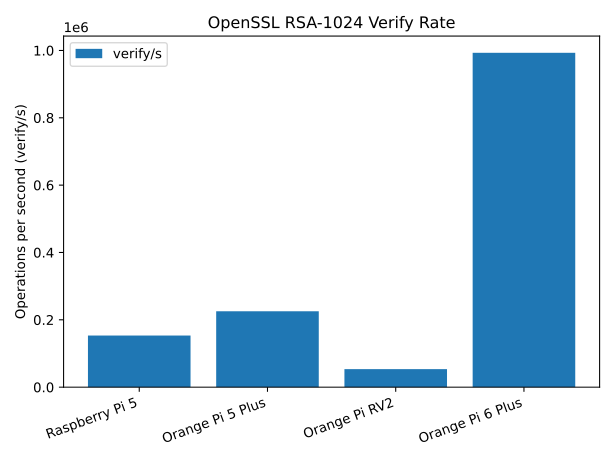
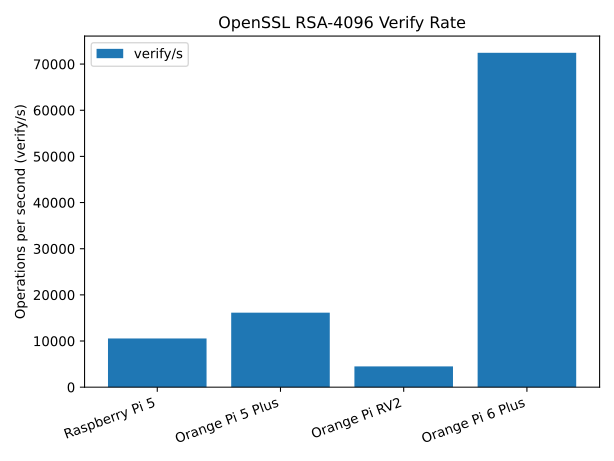
| rsa 1024 (sign : verify) | 7892/s : 153350/s | 11565/s : 225355/s | 2426/s : 53590/s | 49417/s : 993027/s |
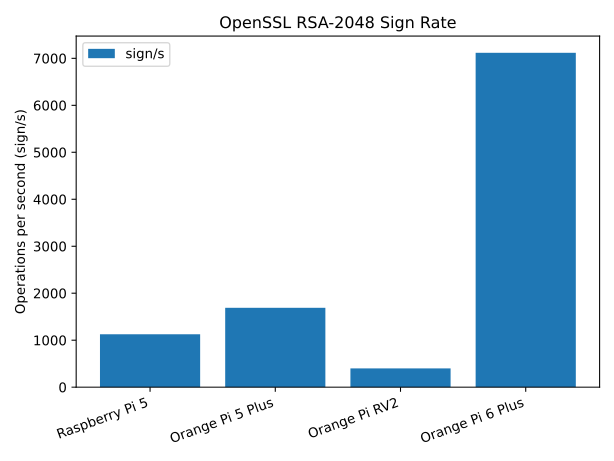
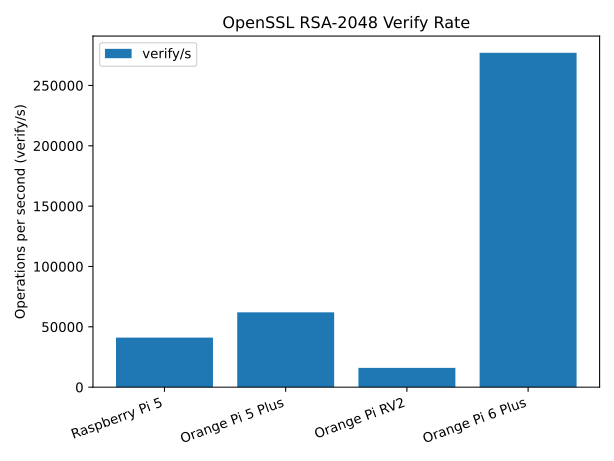
| rsa 2048 (sign : verify) | 1126/s : 41054/s | 1689/s : 62020/s | 400/s : 15982/s | 7118/s : 277061/s |
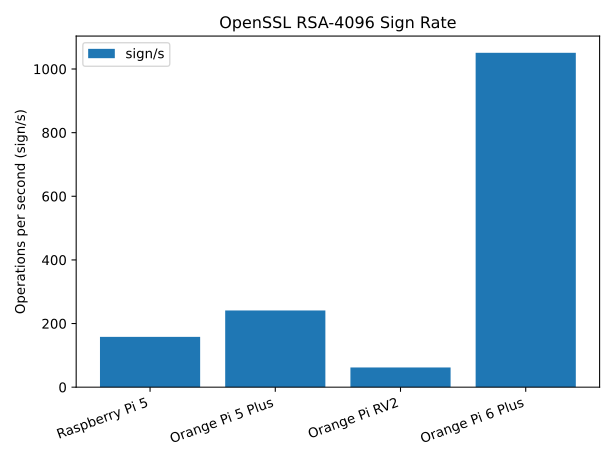
| rsa 4096 (sign : verify) | 158/s : 10547/s | 241/s : 16136/s | 62/s : 4504/s | 1051/s : 72449/s |
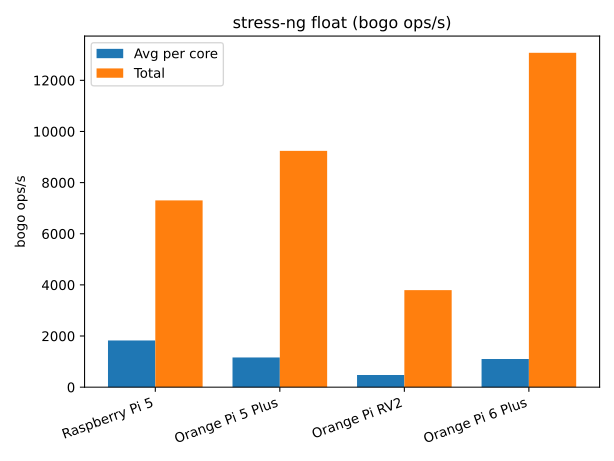
| stress-ng float (avg. per core) | 1826.77 bops/s | 1161.18 bops/s Perf: 1642.78 bops/s | 475.04 bops/s | 1101.80 bops/s Perf: 1438.52 bops/s |
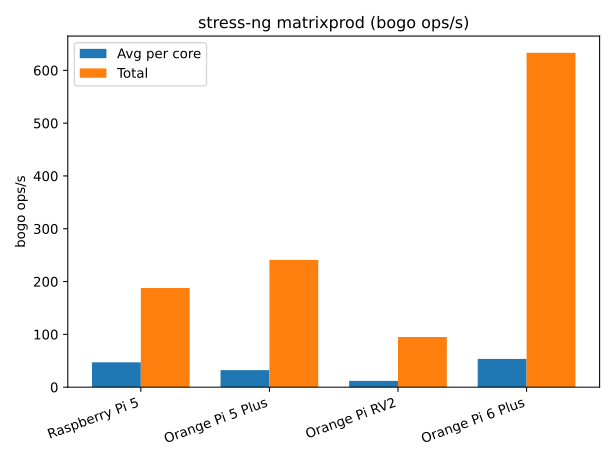
| stress-ng matrixprod (avg. per core) | 46.99 bops/s | 32.23 bops/s Perf: 42.17 bops/s | 11.89 bops/s | 53.58 bops/s Perf: 71.69 bops/s |
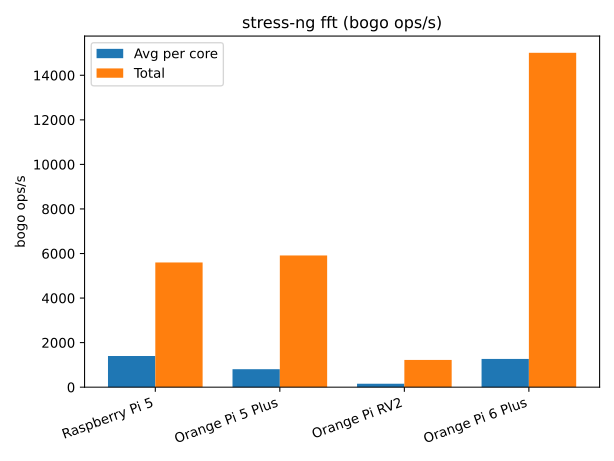
| stress-ng fft (avg. per core) | 1400.12 bops/s | 806.60 bops/s Perf: 1275.46 bops/s | 152.92 bops/s | 1266.58 bops/s Perf: 1771.08 bops/s |
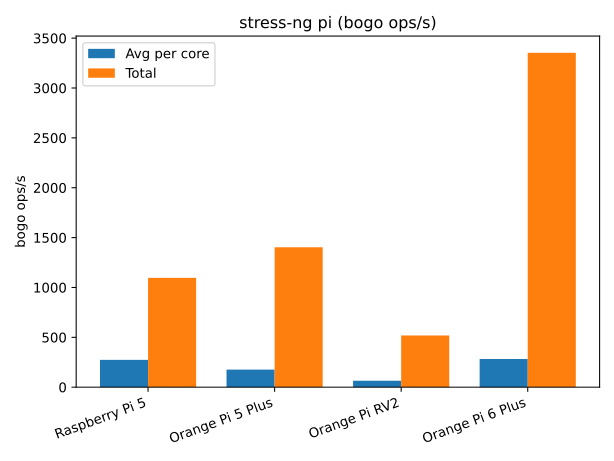
| stress-ng pi (avg. per core) | 274.11 bops/s | 176.37 bops/s Perf: 249.63 bops/s | 64.84 bops/s | 282.79 bops/s Perf: 370.94 bops/s |
| stress-ng float (total) | 7305.06 bops/s | 9240.85 bops/s | 3796.14 bops/s | 13077.23 bops/s |
| stress-ng matrixprod (total) | 187.86 bops/s | 241.00 bops/s | 95.02 bops/s | 633.23 bops/s |
| stress-ng fft (total) | 5599.06 bops/s | 5910.61 bops/s | 1221.77 bops/s | 15010.08 bops/s |
| stress-ng pi (total) | 1096.16 bops/s | 1403.24 bops/s | 518.38 bops/s | 3353.36 bops/s |
Sysbench
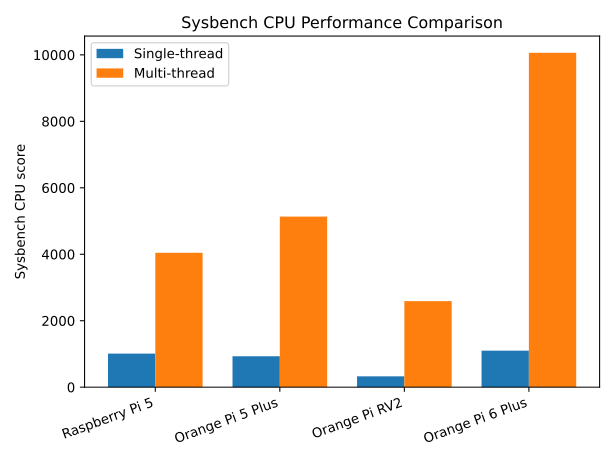
Sysbench is good for measuring relative integer performance. Using the single thread test vs. multi-thread test can show us how well the multi-core systems scale. The test commands are as follows:
$ sudo apt install sysbench
$ sysbench cpu --cpu-max-prime=20000 --threads=1 run
$ sysbench cpu --cpu-max-prime=20000 --threads=$(nproc) run
The Raspberry Pi 5 and the Orange Pi RV2 have homogenous cores and we can see that they scale with close to 100% efficiency. The Raspberry Pi multi-core score is 4x the single-core score. Likewise the Orange Pi RV2 multi-core score is 8x the single-core score. The Orange Pi 5 Plus and Orange Pi 6 Plus are composed of heterogeneous cores: large-small for Orange Pi 5 Plus and large-medium-small for the Orange Pi 6 Plus. Because the cores are not all the same, we wouldn’t expect the multi-core score to scale 100% with the number of cores. For the Orange Pi 5 Plus the multi-core score is 5.5x the single-core score or about 69% efficiency. For the Orange Pi 6 Plus the multi-core score is 9.2x the single-core score or about 76% efficient. Of course in terms of raw performance the Orange Pi 6 Plus is by far the best multi-core performer. The ultra low cost Orange Pi RV2 has the lowest multi-core score.
Sysbench CPU (normalized to Raspberry Pi 5)
| Test | Raspberry Pi 5 | Orange Pi 5 Plus | Orange Pi RV2 | Orange Pi 6 Plus |
|---|---|---|---|---|
| Single-thread | 1.00 | 0.92 | 0.32 | 1.09 |
| Multi-thread | 1.00 | 1.27 | 0.64 | 2.49 |
7Zip Benchmark
The 7Zip tool has a built-in benchmark that tests the real-world task of compressing and decompressing files. This not only exercises integer performance but also memory speed. The test commands are as follows:
$ sudo apt install p7zip-full
$ 7z b
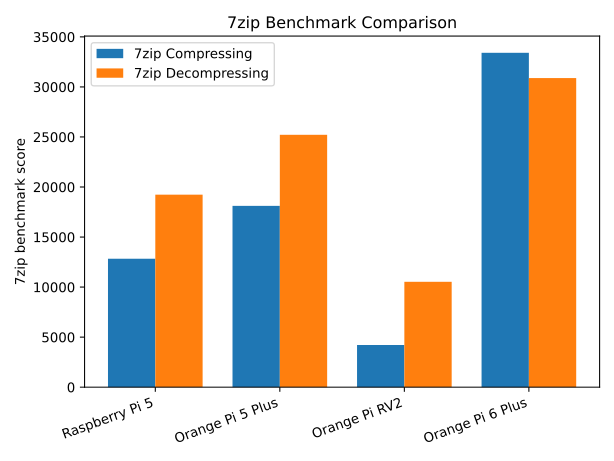
We see a similar result pattern to what we saw with sysbench, the Orange Pi 6 Plus is the fastest performer and the Orange Pi RV2 is the slowest. The Orange Pi 5 Plus has a nice 30-40% speed advantage over the Raspberry Pi 5. The Orange Pi 6 Plus is 60% faster than the Raspberry Pi 5 at decompressing and 2.6x faster at compressing.
7zip Benchmark (normalized to Raspberry Pi 5)
| Raspberry Pi 5 | Orange Pi 5 Plus | Orange Pi RV2 | Orange Pi 6 Plus | |
|---|---|---|---|---|
| Compressing | 1.00 | 1.41 | 0.33 | 2.60 |
| Decompressing | 1.00 | 1.31 | 0.55 | 1.61 |
OpenSSL Benchmark
Another real-world benchmark is to use OpenSSL to test encryption throughput. I tested SHA256 and SHA512 message digest, AES-256-CBC encryption and RSA signing. The following script was used to perform the tests.
openssl_test.sh
#!/bin/bash

n=$(nproc)
for x in sha256 sha512 aes-256-cbc; do
    openssl speed -multi "$n" "$x" 2> /dev/null | awk -v alg="$x" -v n="$n" '$1 == alg {printf "%s,%d,%.2f GB/s\n", alg, n, $2/1024}'
done

openssl speed -multi "$n" rsa 2> /dev/null | awk '$1 == "rsa" { print }'
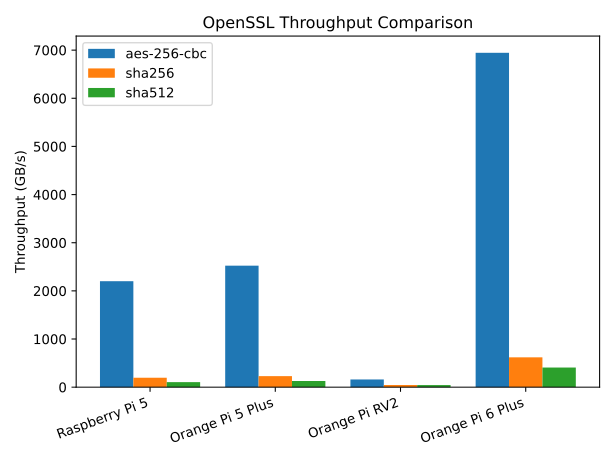
In these tests the differences between the best performer and the slowest performer are more drastic. The Orange Pi 6 Plus is over 3x the speed of the Raspberry Pi 5 whereas the Orange Pi RV2 is 7% as fast on the AES test and 42% as fast on the SHA512 test as the Raspberry Pi 5. I don’t know if this is a real hardware difference, but perhaps might be due to the immaturity of the optimizing compiler toolchain on the RISC-V.
OpenSSL symmetric/hash throughput (normalized to Raspberry Pi 5)
| Test | Raspberry Pi 5 | Orange Pi 5 Plus | Orange Pi RV2 | Orange Pi 6 Plus |
|---|---|---|---|---|
| aes-256-cbc | 1.00 | 1.15 | 0.07 | 3.16 |
| sha256 | 1.00 | 1.17 | 0.23 | 3.16 |
| sha512 | 1.00 | 1.22 | 0.42 | 3.88 |
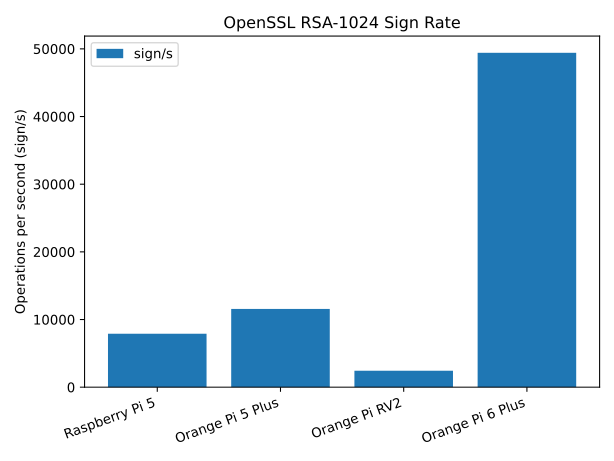
RSA signing and verification show a similar pattern to the other SSL tests. The Orange Pi 6 Plus is by far the best performer and the Orange Pi RV2 turned in the slowest performance. The Orange Pi 6 Plus is over 6x faster than the base Raspberry Pi 5. The Orange Pi RV2 averages 31-43% as fast as the Raspberry Pi 5. The Orange Pi 5 Plus is about 50% faster than the Raspberry Pi 5.
RSA (normalized to Raspberry Pi 5)
| Test | Raspberry Pi 5 (sign:verify) | Orange Pi 5 Plus (sign:verify) | Orange Pi RV2 (sign:verify) | Orange Pi 6 Plus (sign:verify) |
|---|---|---|---|---|
| RSA-1024 | 1.00:1.00 | 1.47:1.47 | 0.31:0.35 | 6.27:6.48 |
| RSA-2048 | 1.00:1.00 | 1.50:1.51 | 0.36:0.39 | 6.32:6.75 |
| RSA-4096 | 1.00:1.00 | 1.53:1.53 | 0.39:0.43 | 6.65:6.87 |
Stress-ng Benchmark
I used stress-ng to test the floating point performance of the four SBCs. Tests were run with the following script.
stress_test.sh
#!/bin/bash

n=$(nproc)
for x in float matrixprod fft pi; do
    echo $x
    stress-ng --cpu "$n" --cpu-method "$x" --metrics-brief --timeout 60s
done
As with the integer tests, we see a similar performance pattern with the floating point tests. The average per core results indicate that the Raspberry Pi 5 posted the best single core result. This is because the single core performance of the Orange PI RV2 is certainly lower. The mixed core architecture of the Orange Pi 5 Plus and Orange Pi 6 Plus are averaging performance and efficiency cores which lowers their average.
Stress-ng (avg. per core) — normalized to Raspberry Pi 5
| Test | Raspberry Pi 5 | Orange Pi 5 Plus | Orange Pi RV2 | Orange Pi 6 Plus |
|---|---|---|---|---|
| stress-ng float | 1.00 | 0.64 Perf: 0.90 | 0.26 | 0.60 Perf: 0.79 |
| stress-ng matrixprod | 1.00 | 0.69 Perf: 0.90 | 0.25 | 1.14 Perf: 1.53 |
| stress-ng fft | 1.00 | 0.58 Perf: 0.91 | 0.11 | 0.90 Perf: 1.26 |
| stress-ng pi | 1.00 | 0.64 Perf: 0.91 | 0.24 | 1.03 Perf: 1.35 |
In terms of absolute performance the Orange Pi SBCs compare more favorably to the Raspberry Pi 4. The Orange Pi RV2 benefits from having twice the homogenous core count as the Raspberry Pi 4. Likewise the increased efficiency/performance core counts of the Orange Pi 5 Plus and Orange Pi 6 Plus allow them to score higher than the Raspberry Pi 5.
Stress-ng (total) — normalized to Raspberry Pi 5
| Test | Raspberry Pi 5 | Orange Pi 5 Plus | Orange Pi RV2 | Orange Pi 6 Plus |
|---|---|---|---|---|
| stress-ng float | 1.00 | 1.26 | 0.52 | 1.79 |
| stress-ng matrixprod | 1.00 | 1.28 | 0.51 | 3.37 |
| stress-ng fft | 1.00 | 1.06 | 0.22 | 2.68 |
| stress-ng pi | 1.00 | 1.28 | 0.47 | 3.06 |
Storage Performance
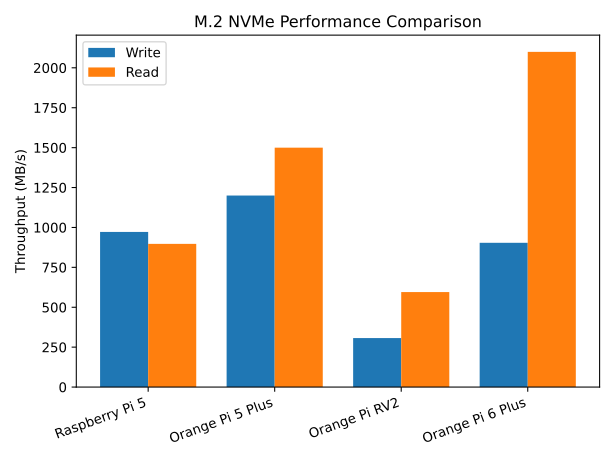
All of the four SBCs have M.2 M-Key slots for adding an NVMe PCIe SSD. This slot is built into the Orange Pi SBCs and is added using an additional HAT on the Raspberry Pi 5. For my Raspberry Pi 5s I used the M.2 + PoE HAT from WaveShare for $25 which also provides a fan/heatsink in addition to the power and M.2 slot. The specs on the M.2 slot vary from PCIe 2.0 1 Lane on the Raspberry Pi 5 to PCIe 4.0 4 Lane on the Orange Pi 6 Plus.
The following script uses the dd command to test read/write SSD speed.
ssd_test.sh
#!/bin/bash

mem_gb=$(awk '/MemTotal/ {printf "%.f", $2/1024/1024 + 0.999999}' /proc/meminfo)

dd if=/dev/zero of=test.bin bs=1G count=$mem_gb
dd if=test.bin of=/dev/null bs=1G
rm test.bin
SSD and PCIe Performance
| Test | Raspberry Pi 5 | Orange Pi 5 Plus | Orange Pi RV2 | Orange Pi 6 Plus |
|---|---|---|---|---|
| Write Performance | 972 MB/s | 1.2 GB/s | 307 MB/s | 904 MB/s |
| Read Performance | 897 MB/s | 1.5 GB/s | 595 MB/s | 2.1 GB/s |
Conclusion
The performance tests bear out the initial impressions that I had. The Orange Pi 6 Plus is a great performer for a low cost desktop class computer. It has all of the features that you would expect on a desktop computer. The Orange Pi RV2 is, on the other hand, about what you would expect from an ultra low cost SBC. It is great if you need an SBC for a maker project but don’t want to spend a lot of money. The Raspberry Pi 5 and Orange Pi 5 Plus are in the middle of the pack with the Orange Pi 5 Plus beating out the Raspberry Pi 5 in all tests but not by much. The extra four efficiency cores of the Orange Pi 5 Plus are helpful in making the SBC more responsive when the performance cores are busy. Of course storage throughput is one of the weak spots with most SBCs but the Orange Pi 6 Plus has desktop class performance if you want a really responsive system.